Where to Place Your Router for the Best Wi-Fi Signal
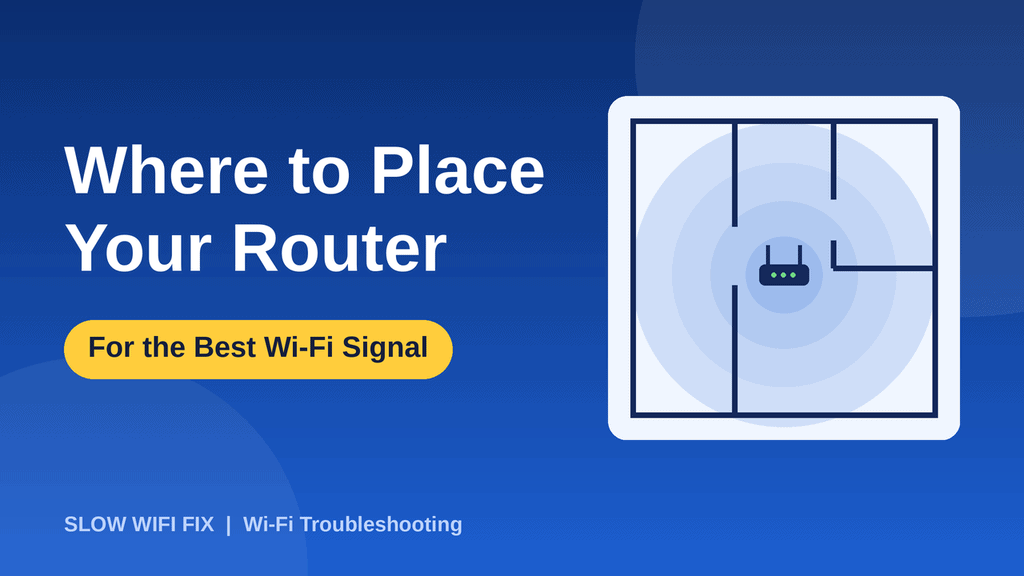
Knowing where to place your router can matter more than the router itself. A great router in a bad spot gives weak Wi-Fi, while an average router in a good spot can cover your whole home. The best part is that moving it costs nothing and takes a few minutes. This guide shows you the ideal position, the spots to avoid, and how to test the difference.
Quick answer: place your router in a central, open, raised spot, away from thick walls, metal, and other electronics. Never hide it in a cabinet, a corner, or behind the TV.
Why router placement matters
Wi-Fi is a radio signal. It spreads out from the router in all directions and gets weaker with distance and with everything it passes through. Walls, floors, furniture, and even water absorb or block part of the signal. If the router sits in a corner, half of its signal goes outside your home, and the rooms on the far side get the weakest connection.
1. Put it in the center of your home
The closer your router is to the middle of the space you use, the more evenly the signal reaches every room. If your internet cable enters the house in a corner or a back room, you do not have to leave the router there. You can connect the modem and the router with a longer Ethernet cable, so the router can sit in a better position.
2. Raise it off the floor
Place the router on a shelf, a table, or a wall mount, ideally around chest height or higher. Signals travel down and outward better than they travel up through floors, and furniture on the ground blocks more of the signal. A router on the floor usually gives a weaker connection than the same router on a shelf.
3. Keep it in the open
Do not put your router inside a cabinet, drawer, or closet, or behind a TV or a pile of books. Even thin furniture can reduce the signal. An open spot with a clear view of the rooms you use is best. Leaving it in the open also helps it stay cool, which keeps it stable for longer.
4. Stay away from things that block or disturb the signal
Some objects hurt Wi-Fi more than others. Keep your router away from:
- Thick walls, especially concrete, brick, and stone.
- Metal objects such as filing cabinets, metal shelves, and large appliances.
- Mirrors and glass, which can reflect the signal.
- Water, for example fish tanks, water heaters, and big water tanks, since water absorbs Wi-Fi signals.
- Other electronics such as microwave ovens, cordless phones, baby monitors, and Bluetooth speakers, which can cause interference.
If your Wi-Fi gets worse when you cook or when a certain device is on, interference is a likely cause. For more on this, see our guide on what to do when Wi-Fi keeps disconnecting.
5. Point the antennas the right way
If your router has external antennas, their direction changes how the signal spreads. A vertical antenna sends the signal mostly sideways, which suits a single-floor home. A horizontal antenna sends more of it up and down, which can help on another floor. In a two-story home, a good approach is to keep one antenna vertical and tilt the other one. Routers with built-in antennas do not need adjusting.
6. Choose the right floor in a multi-story home
If you live in a house with more than one floor, put the router on the middle floor, or on the ground floor in the center of the house if you only have two floors and use both. Avoid basements and garages. In an apartment, a central spot in the living area is usually best, and it is better to keep the router away from the outer walls so the signal does not go to waste.
Good spots vs bad spots
| Good spots | Bad spots |
|---|---|
| Center of the home | Corner of the house |
| On a shelf or table | On the floor |
| In an open space | Inside a cabinet or closet |
| Away from other electronics | Next to the microwave or TV |
| Near the rooms you use most | In a basement or garage |
How to test your new router position
- Test before you move it. Run a speed test in the rooms where you use Wi-Fi most, and write down the results.
- Move the router to the new position and wait a few minutes for it to settle.
- Test again in the same rooms, using the same device and the same speed-test site.
- Compare. If the weak rooms got better, you found a good spot. If not, try another position and repeat.
If it still looks slow after moving it, restart it first by following our guide on how to restart a router the right way, then read our 12 fixes for slow Wi-Fi.
What if moving the router is not enough?
Sometimes the house is too big, or the walls are too thick, for one router to cover everything. In that case, a few options can help:
- Use the 5 GHz band near the router and 2.4 GHz in far rooms. Our guide on 2.4 GHz vs 5 GHz Wi-Fi explains which one to choose.
- Add a Wi-Fi extender, mesh system, or access point to cover the far rooms.
- Upgrade an old router. A router more than five years old may not handle modern speeds or many devices.
Safety note: do not block the router’s ventilation openings, and keep it away from water and heat. Follow the manufacturer’s instructions and never open the router yourself. See our Disclaimer for more information.
Frequently asked questions
Is it better to put a router high or low?
Higher is usually better. A shelf or table at chest height or above gives a clearer path to most devices than a spot on the floor.
Does it matter if the router is in a cabinet?
Yes. A cabinet blocks part of the signal and can make the router run hotter. If you must hide it, use an open or ventilated shelf rather than a closed door.
Does the direction of the antennas matter?
It can. Vertical antennas spread the signal sideways, which suits one floor, while angled antennas help cover another floor. Routers with internal antennas cannot be adjusted.
Can I move my router far from the modem?
Yes, if you use a longer Ethernet cable between the modem and the router. Do not stretch the cable between the wall socket and the modem if you are unsure, and ask your internet provider first.
Should my router be in the living room?
If your living room is close to the center of your home and you use Wi-Fi there a lot, it is a good choice. Just keep the router in an open spot and away from the TV and other electronics.
Not sure where the best spot is in your home? Describe your layout on our Contact page and we will suggest a position.